New Alerts & Actions screen
ClientSuccess combines tasks and alerts into one Alerts & Actions screen, a split-pane view to triage alerts and create follow-up tasks with a single click.
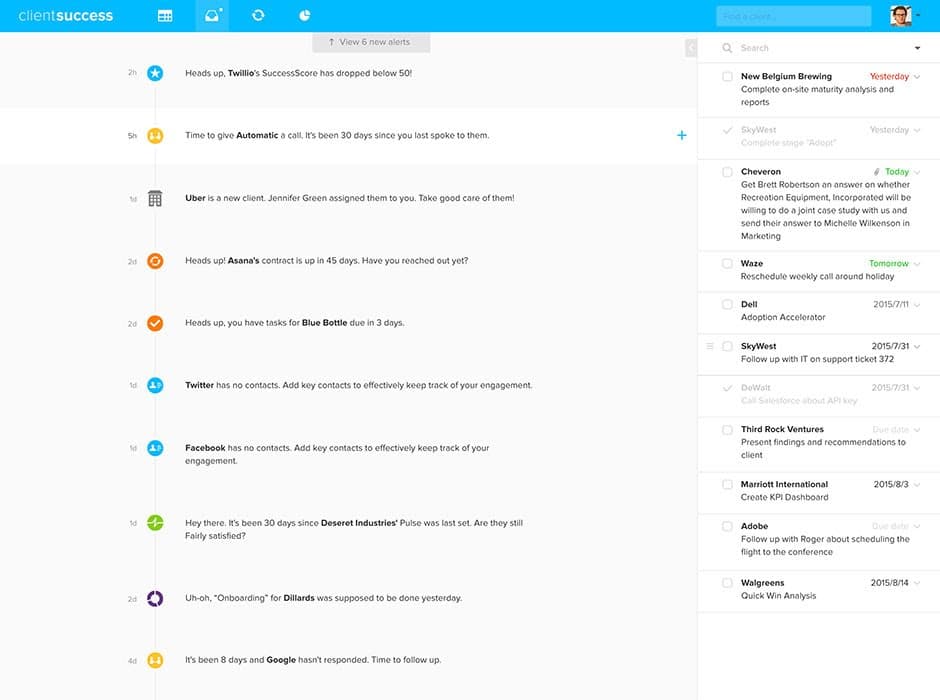
You'll notice a new inbox icon in the menu bar. The Tasks screen has been combined with a new alerts experience and relaunched as Alerts & Actions. In this new, split-pane view, you can now browse all of your alerts alongside the rich task management features you've come to rely on. Whether you like to triage items as they come in or you'd rather review the list in the morning and make a game-plan for the day, we've designed this screen to enhance your workflow.
Sort, re-assign, re-set due dates, filter, and search—and, certain alerts, even come with the option to create a follow-up task with a single click. If you've just been notified that a client's SuccessScore has dropped below 50, for example, hover over the alert and click the blue '+' icon to add a task to today's to-do list to follow up and find out what's up.
Written by
ClientSuccess
Last updated
Share
Get more like this
Customer success insights, delivered to your inbox.