ClientSuccess MCP Server
Ask your AI assistant about any customer. Get the real answer.
The ClientSuccess MCP server connects your customer success data to Claude and other AI assistants. Ask about renewals, churn risk, NPS, or a single account in plain English, and get an answer grounded in your live ClientSuccess data, not a guess. Read-only, and scoped to the permissions each person already has.
Read-only Your own permissions ~2 minute setup
What renews in the next 90 days, and which of those accounts are at risk?
You have 14 renewals in the next 90 days, worth $1.24M ARR. Three need attention now:
- Northwind Logistics$210K · renews Nov 14At Risk
Champion left in August and no executive sponsor has been identified since.
- Cobalt Analytics$96K · renews Oct 2Moderate Risk
Two open escalations, and NPS dropped from 8 to 5 last quarter.
- Vantage Retail Group$148K · renews Dec 1At Risk
No engagement logged in 46 days. Last touch was a support thread.
The remaining 11 are Satisfied or better. Want me to draft a save plan for Northwind?
Illustrative example. Account names are fictional; answers reflect your own ClientSuccess data and permissions.
What is the ClientSuccess MCP server?
The ClientSuccess MCP server is a read-only connection that lets an AI assistant retrieve your ClientSuccess customer success data and answer questions about it in plain English. MCP, the Model Context Protocol, is an open standard for connecting AI assistants to the systems where your data actually lives. Once an admin enables it and each person signs in with their own ClientSuccess credentials, an assistant like Claude can look up customer records, Pulse health and sentiment, SuccessScore, recent engagements, contracts and renewals, contacts, tasks, and NPS feedback, then reason across all of it in one answer.
The difference from a general-purpose chatbot is grounding. A chatbot can write you a renewal email; it has no idea which accounts are renewing. With the MCP server connected, the answer comes from your live ClientSuccess data, the same records and the same permissions, so it is specific to your book and checkable against the source.
How it works
Three moving parts, one of which is you typing a question.
STEP 1
You ask, in plain English
“Which accounts are at risk, and why?” No dashboard, no filters, no report to build.
STEP 2
The MCP server answers
Your AI assistant calls the ClientSuccess MCP server, signed in as you. Your login, your permissions, your company's data only.
STEP 3
Read-only data comes back
It retrieves and reasons over the records you already have access to. It cannot create, edit, or delete anything.
No data warehouse, no pipeline to build, no export. The assistant queries ClientSuccess live, as you, each time you ask.
What you can ask it
Real questions, answered from your own data. No query language, no report builder.
“Which of my accounts are at risk, and why?”
Pulse sentiment, score changes, and the reason codes behind them.
“Brief me before my call with this customer.”
Recent calls, emails, and meetings, plus open tasks and health trend.
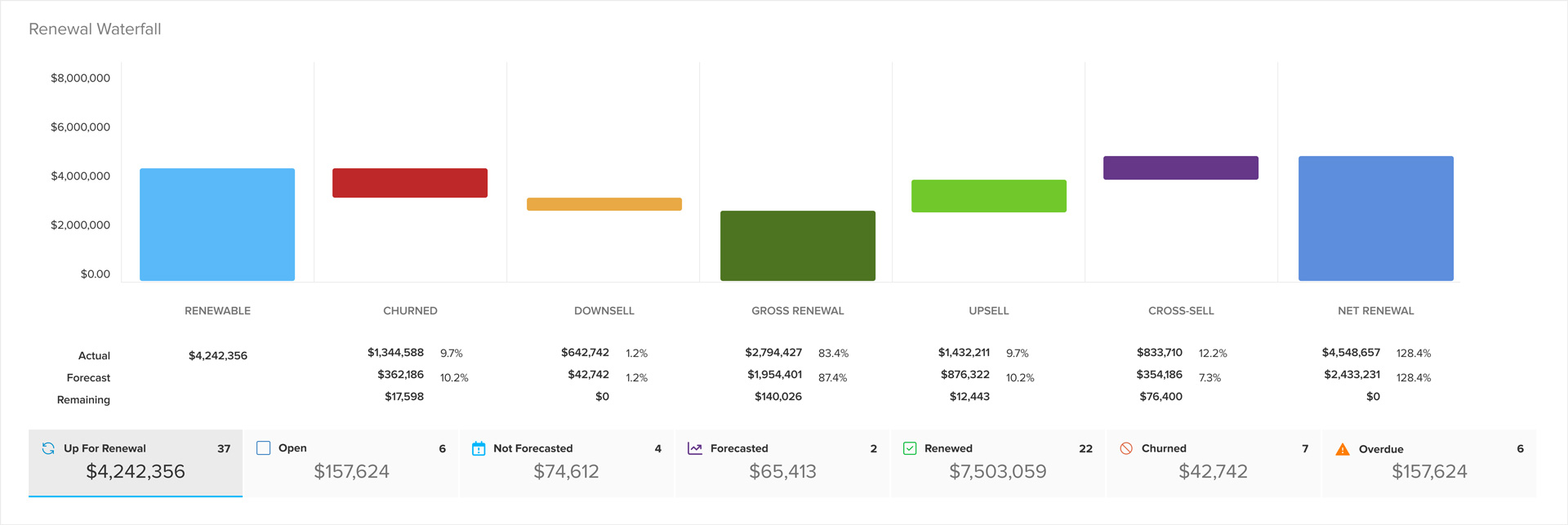
“What renews in the next 90 days, and what's the ARR?”
Renewal pipeline for any date range, with contract terms and values.
“What did we last talk about with this account?”
Engagement history: subject, date, author, and the full note text.
“Which CSMs have the riskiest books?”
Portfolio health rolled up by CSM across your whole team.
“Who are my detractors, and what did they say?”
NPS and survey scores with the written feedback behind them.
“What should I focus on today?”
A prioritized list built from risk, renewals, and open tasks.
“Where are my expansion opportunities?”
Healthy accounts with growth signals, ranked and explained.
Ten minutes of prep, in one question
The pre-call scramble is the most expensive ten minutes in a CSM's day: open the account, skim the last few notes, check the health trend, look for open tasks, remember who you're actually talking to. Multiply it by six calls a day.
Asked once, the same brief comes back assembled, and because it reads from ClientSuccess directly, it's current as of the moment you asked.
Brief me before my 2pm with Cobalt Analytics.
Cobalt Analytics: $96K ARR, renews Oct 2. Pulse: Moderate Risk (down from Satisfied in July).
- Last touch: QBR on Aug 21. They raised reporting gaps twice and asked about the roadmap.
- Open tasks: 2, both assigned to you, both past due.
- NPS: dropped 8 → 5. Comment: “Great team, but we still can't get the reports our board asks for.”
- Who's on the call: Dana Whitfield (VP Ops, your champion) and a new director added last month.
Lead with the reporting gap. It's the through-line in all three signals.
Illustrative example. Account names are fictional.
Who gets the most out of it
Same connection, four very different days.
CSMs: walk into every call prepared
A full pre-call brief in seconds instead of ten minutes of tab-switching: what's happened lately, who you're meeting, what's open, and where health is trending.
CS leaders: see the book, not the dashboard
Ask about renewal exposure, risk concentration, or NPS movement and get an answer with the reasoning shown, without waiting on a report.
Team leads: coach with context
Compare portfolio health across CSMs, spot where a book is drifting, and bring specifics to your one-on-ones.
RevOps: stop building one-off reports
Ad-hoc questions get answered where they're asked. Fewer report requests in the queue, and no new pipeline to maintain.
Built so the security answer is short
Connecting customer data to an AI assistant should raise questions. These are the three that matter, answered up front.
Read-only by design
The server can retrieve data and nothing else. Write capability was never built, so there is nothing to switch on by mistake. An AI assistant cannot change a health score, close a task, or edit a contract.
Scoped to your own permissions
Every person connects with their own ClientSuccess credentials, so they see exactly what they'd see when signed into ClientSuccess: same company boundary, same role permissions. Connecting an AI assistant doesn't widen anyone's access.
You stay in control
Turning it on is your organization's decision, not a default. Your admin enables it, and access can be switched off at any time. ClientSuccess is SOC 2 Type II certified.
Reviewing this with your security team? The exact data scope and the technical detail are published in our Help Center, alongside our security & compliance overview.
See the MCP server running on your customer data
We'll walk through the questions your team asks most, and what comes back.












Keep exploring
AI & Automation
SmartCS™, playbooks, and automated customer communications.
Learn moreIntegrations
Connect ClientSuccess to the rest of your data ecosystem.
Learn moreInsights & Analytics
From customer insights to actions to measurable results.
Learn moreSecurity & Compliance
How we protect your customer data, including SOC 2 Type II.
Learn more