Managing usage events
A new settings screen lets you manage usage events in ClientSuccess: toggle visibility, set the primary event, and choose the default date range and metric.
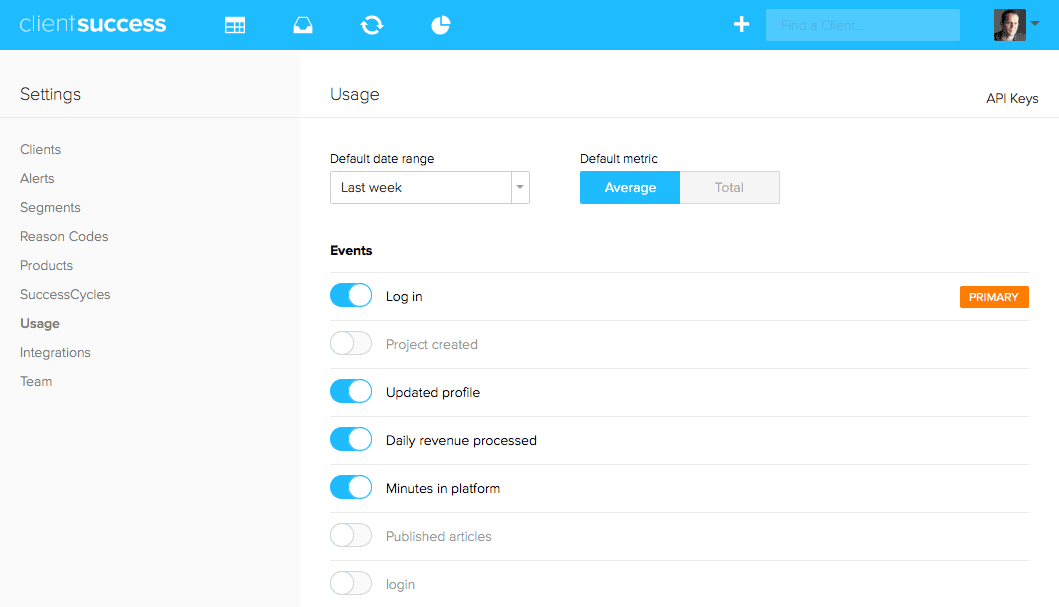
Happy holidays! We have added a new settings screen for managing your usage events. On this screen you can toggle which events are visible, designate which is primary, and set the default date range and metric (average versus total). These changes affect the events displayed in the Usage module on the client record immediately.
As a reminder, we have three methods for sending in usage events to ClientSuccess:
- Adding the ClientSuccess javascript snippet to your app. This is best for tracking high-level events that occur in the interface.
- Submitting events to the ClientSuccess usage API. This is best for lower-level, complex events, calculated, or batched data.
- Sending data in via our Segment integration.
Written by
ClientSuccess
Last updated
Share
Get more like this
Customer success insights, delivered to your inbox.