SuccessCycle Enhancements and Salesforce Package Update
A ClientSuccess product update with concurrent SuccessCycle enhancements, clearer primary cycle labeling, task visibility improvements, and a Salesforce update.
TL;DR
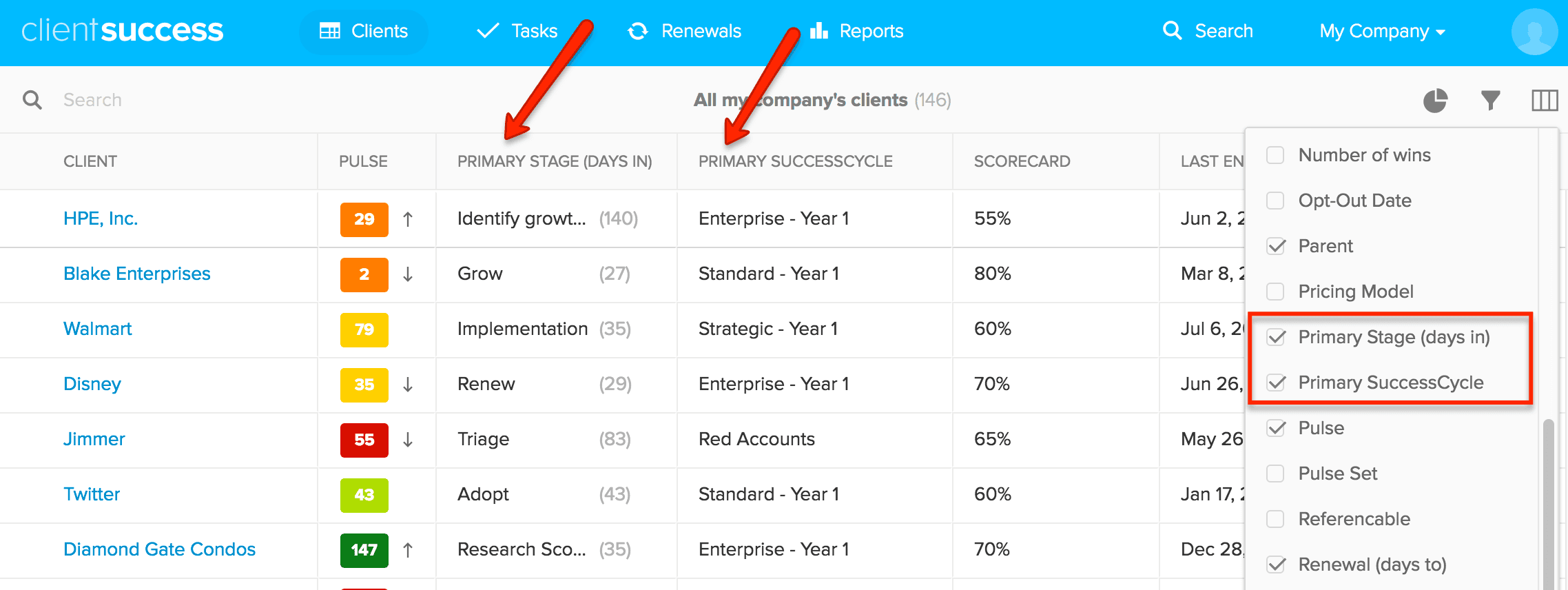
- ClientSuccess added enhancements for concurrent SuccessCycles, including clear "Primary SuccessCycle" and "Primary Stage" labeling across the clients screen.
- Concurrent SuccessCycle activities and tasks with due dates now appear on the tasks screen, and users can remove concurrent SuccessCycles as needed.
- The Salesforce integration received minor updates and bug fixes that admins should install.
Hope all is well on the Customer Success frontline! We've been listening to your feedback about our new concurrent SuccessCycle capability, and our team has some enhancements for you:
SuccessCycle Enhancements
- With the introduction of concurrent SuccessCycles, we’ve labeled “Primary SuccessCycle” and “Primary Stage (days in)” across the clients screen and when editing a client. Now there's no more confusion as to which SuccessCycle you're seeing on the home clients screen.
- When you jump into a client record, the Primary SuccessCycle in the SuccessCycle app is tabbed on left and automatically emphasized, making it more clear which one you're working on.
- Concurrent SuccessCycle activities and tasks (with due dates) now show up under the tasks screen. These next steps and action items can help guide your proactive execution across concurring SuccessCycles.
- When trying to add SuccessCycles to a client, the SuccessCycle dropdown list filters out previously completed cycles.
- Users can now remove a concurrent SuccessCycles as needed.
Salesforce Update
For those utilizing our Salesforce Integration, we’ve made some minor updates and squashed some bugs. Be sure to have your admin install the update by following this link. (Note: If you haven’t updated in awhile or don’t know when the last time you updated, we’d recommend doing so now for a smoother Salesforce experience)
Written by
ClientSuccess
Last updated
Share
Get more like this
Customer success insights, delivered to your inbox.