New Churn Reasons Report and Other Updates
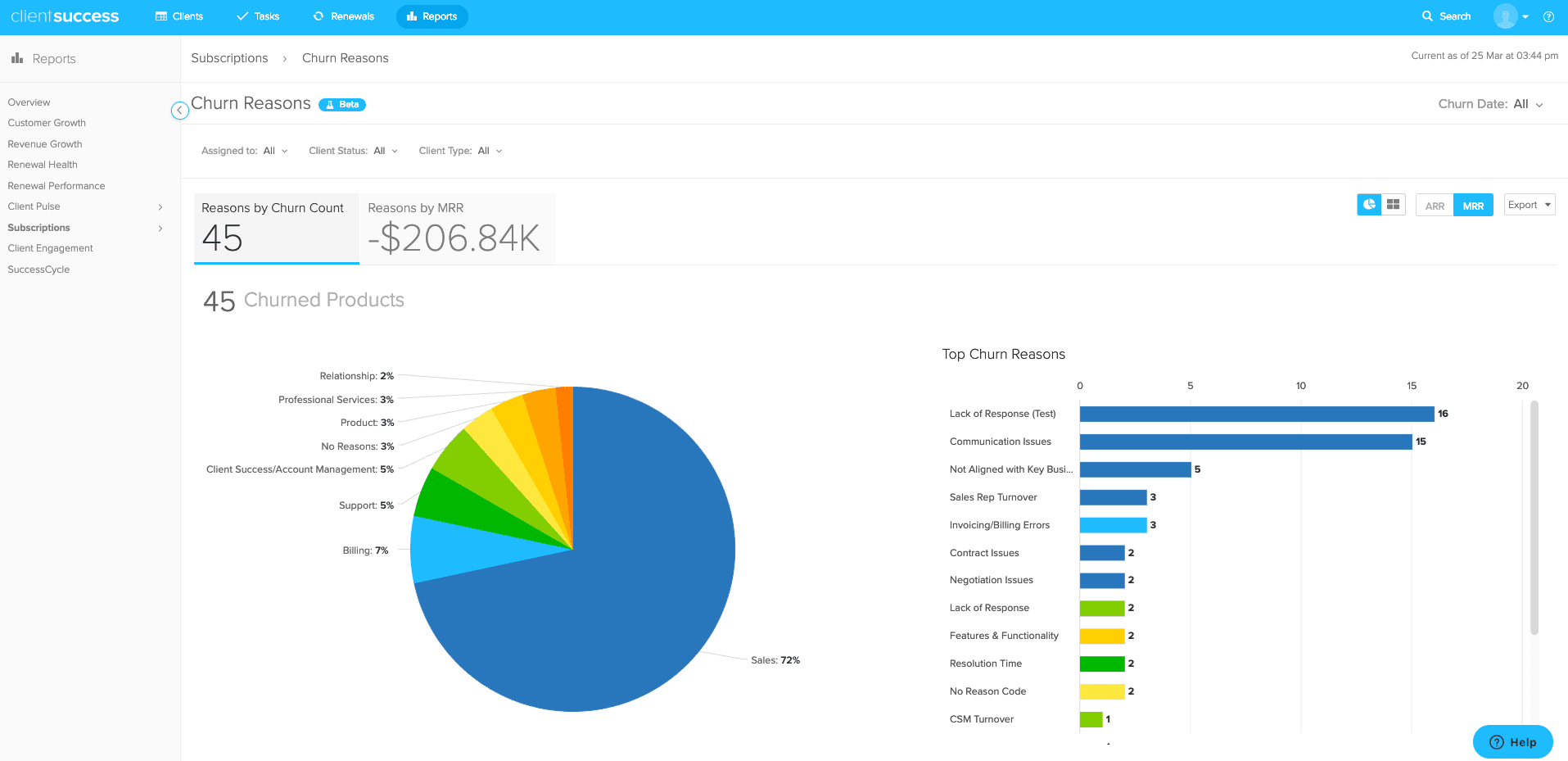
The Churn Reasons Report shows why customers churn by reason code, ARR, and MRR, with date filters and charts to analyze lost revenue across your portfolio.
TL;DR
- The Churn Reasons Report lets you answer questions about your client subscription book-of-business by breaking down churn by reason code.
- You can view reasons by churn count or by primary revenue metric, toggling between ARR and MRR, and visualize them in a pie chart or treemap.
- The report includes preset and custom date ranges, filters for assigned CSM, status, and client type, and exportable charts via PDF or CSV.
We’re excited to announce the launch of our new Churn Reasons Report! Similar in functionality to our recently released Pulse Health, Pulse Reasons and Pulse Change Over Time Reports, the new Churn Reasons Report allows you to quickly answer important questions about your client subscription book-of-business.
Reports Tab > Subscriptions > Churn Reasons
Go to Report Now
Pulse Change Over Time Report Includes:
- Churn date-picker, with preset or custom selected date ranges
- Filter by Assigned to, Status, and Client Type (Product type anticipated as future enhancement)
- View Reasons by Churn Count (products or subscriptions) or Primary Revenue Metric (toggle between ARR and MRR)
- View Churn Reason Code breakdown in a pie chart or treemap
- Quick-view stats of Top Churn Reasons
- Interactive charts allow you to quickly sub-segment the data
- Exportable chart functionality via PDF or CSV (table export anticipated as future enhancement)
- Report includes a filterable client list featuring product information, such as reason codes, notes, and churn data
- Increased report speed and performance
Subscription Churn Insights at Your Fingertips
This new report allows you to better understand the lost revenue of your clients. Explore and answer important questions about your client subscription portfolio through a powerful set of different filters (Assigned to, Status, Client Type).
Sample Use Cases
- Hold effective one-on-one meetings with your team members by viewing Reason Codes by assigned CSM. See how their client churn book-of-business has performed regarding churn and help them better succeed by removing potential roadblocks.
- View Reason Code portfolio by revenue metric. For example, you can see your churned book-of-business by ARR or MRR. Deep dive by clicking the pie chart or treemap.
Things to Note
- Reasons by Product Count and revenue indicate totals for selected filters (ie more than one product per client)
- Reason Code pie chart and treemap breakdowns include percentages, totals, and revenue metric reflective of reason per product subscription line.
Other Updates
Now that our new Pulse reporting suite has been launched, we will be retiring the legacy Pulse Reports (Summary, Recent Changes, and Risk Factors) on Friday March 29.
We encourage you to reach out to Support or your CSM with any questions.
Thanks,
The ClientSuccess Team
Written by
ClientSuccess
Last updated
Share
Get more like this
Customer success insights, delivered to your inbox.